

tips for mailing out treasures from home

Are you mailing out t shirts for a memory quilt? Or maybe Christmas gifts to loved ones far away? Are you avoiding the dreaded post office queue? I send out a lot of mail, especially this time of year, and never once actually go to the post office.
Tools For at Home Shipping
- postal scale (a kitchen scale also works wonderfully). Here is the one I have used for years:

- measuring tape
- printer
- sticky mailing labels (not necessary, but fun to have)
- packing tape: Amazon has a multipack for super cheap!
- internet, but I’m assuming you have that already or else you wouldn’t be here!
Now you’re ready, but how to get the actual label??
You have a few options here. I personally check back-and-forth between usps.com click and ship and pirateship.com. Fun fact, pirate ship is actually owned by the USPS. They set up this website when they realized that they website infrastructure couldn’t handle the amount of online mailing so they problem solved with creating a whole new platform. Sometimes pirate ship has a better value than the post office, but sometimes it’s the same and it’s just easier for me to be on one site. Obviously, when there’s a price difference, I will always go with the cheaper shipping option!
The website itself is very straightforward for either platform. It will ask you your address, the mailing address, how much does the package weigh, how big the boxes, and any hazardous materials and value of the package.
After you filled out all that information and purchased your label, save as a PDF and print. I always save as a PDF because it’s easier to track back down if needed, and on my older printer, PDFs print cleaner.
Labeled up, now get this thing on its way!
It doesn’t matter if you chose to get your label from pirate ship, directly from USPS, or any other online platform that will print a label for the post office, this next step is the same.
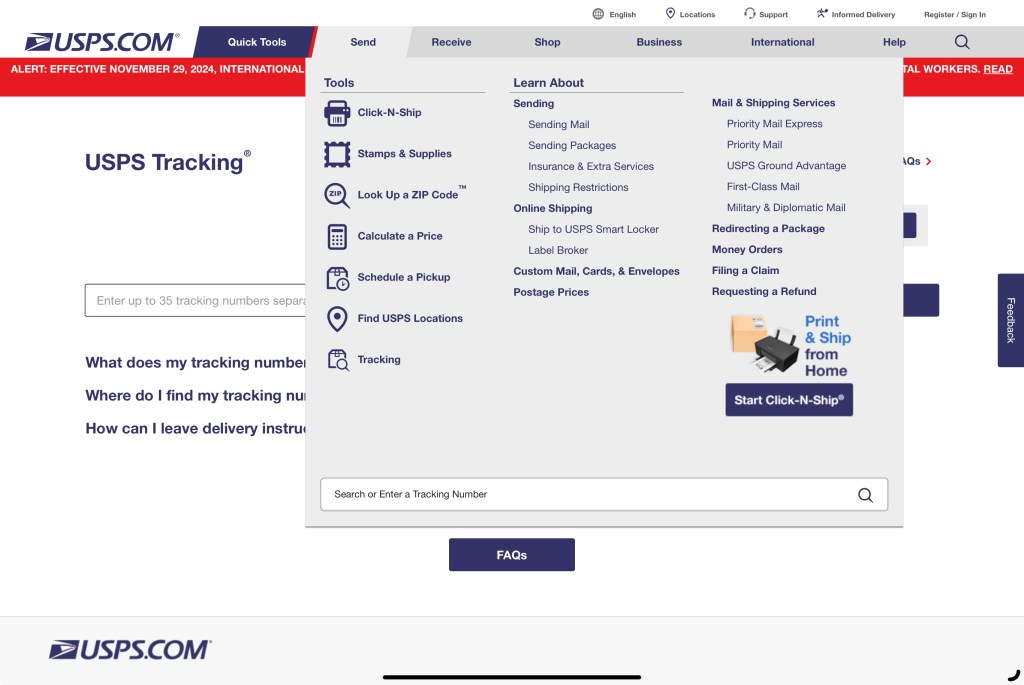
once you are at usps.com, click send and then click schedule a pick up. And here is also where you can make the label under click and ship if you haven’t done so already.

it will ask you your address, how many packages they’re picking up, the weight of said packages, and where they will be. You can choose places like the mailbox, front door, garage, etc.
after that, it will pull up a calendar and ask you when you want them to pick it up. If you schedule it during your regular mail pick up hours, there is no charge to use the service. Then all that’s left to do is put the box on your porch!
Easy Peezy, and you didn’t even need to leave the house!
Pro tip: While you’re at it, set up an account at usps.com, and it will save your mailing information for each time you use their services. It will also email you daily your informed delivery so you know exactly what mail pieces are coming each day!
Hope this helps take a little bit of stress off of the whole mailing stuff out process!
 KD Quilts
Leave a comment